The Carrier File
What each of the twelve Carrier File tabs shows in Market Tracker, how to deep-link to one, and what an empty section means versus missing data.
The Carrier File is everything Market Tracker holds on one USDOT, across twelve tabs. Open it by clicking a carrier's USDOT in the grid, by picking a search suggestion, or by going to /app/carriers/{dot}/ directly.
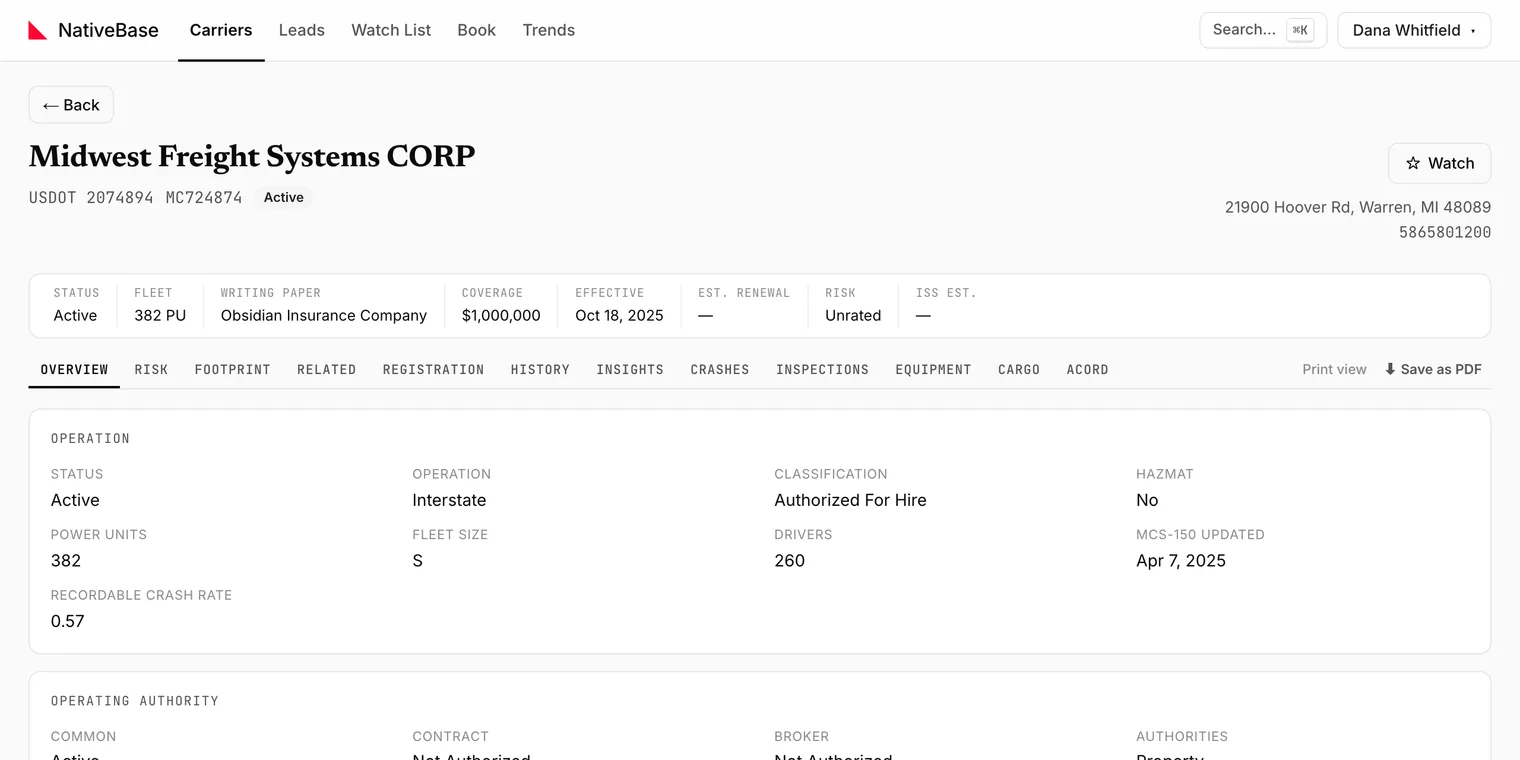
#The tabs
| Tab | Answers |
|---|---|
| Overview | Who is this carrier, is it operating, and who insures it |
| Risk | How this carrier's loss exposure reads against the market |
| Footprint | Where it has actually been observed operating |
| Related | Other carriers sharing identifiers with this one |
| Registration | Its federal registration record |
| History | Its insurance filing history over time |
| Insights | The things worth noticing, pulled together |
| Crashes | Reported crashes |
| Inspections | Roadside inspection results |
| Equipment | Vehicles observed on inspections, with VIN decoding |
| Cargo | Declared cargo classifications, plus classes read from what the carrier wrote under Other, which are marked |
| ACORD | Generate a prefilled ACORD form or a submission packet |
#Deep links
Each tab is addressable by URL fragment: #Risk, #History, #Inspections and so on, so you can send a colleague a link that opens on the tab you mean.
Older links using #Summary still work; they resolve to Overview.
#Sections that load on demand
Equipment and Registration load when you open them rather than with the rest of the page. A brief loading state on first open is normal.
#Empty sections
An empty section is not necessarily an error. The Carrier File assembles several independent federal sources, and each one degrades on its own: one being unavailable leaves that section empty while the rest of the file renders normally.
Watch out
Two empty states mean specific things and should not be read as "low risk":
- Risk showing as unrated means there is not enough inspection data to rate the carrier. It does not mean the carrier is low risk.
- Active authority with no BI/PD filing is a compliance flag. Since September 2026 every carrier in that state is reconciled daily against FMCSA's live registration record (MOTUS), which holds renewal filings the public feeds stopped publishing after the May 2026 system migration, so the flag reflects the live record rather than the feed. The file says when the live record was last checked, and the X-date panel says how the estimate was made (a first-year filing estimate, a policy-anniversary estimate, or a transaction date).
#Watching a carrier from its file
The star control adds the carrier to your Watch List, which baselines it that day and reports what changes afterwards.
#Equipment and VINs
The Equipment tab lists vehicles observed during inspections and decodes their VINs: year, make, model and weight class. If you only need a VIN decoded and are not in the app, the public VIN decoder does the same job.
#Generating paperwork
The ACORD tab produces a prefilled ACORD form and a submission packet from the carrier's record. See ACORD autofill and submission packets.
Last reviewed