Carriers filter reference
Every filter on the Market Tracker Carriers grid: what each one matches, the values it accepts, and what an empty result usually means.
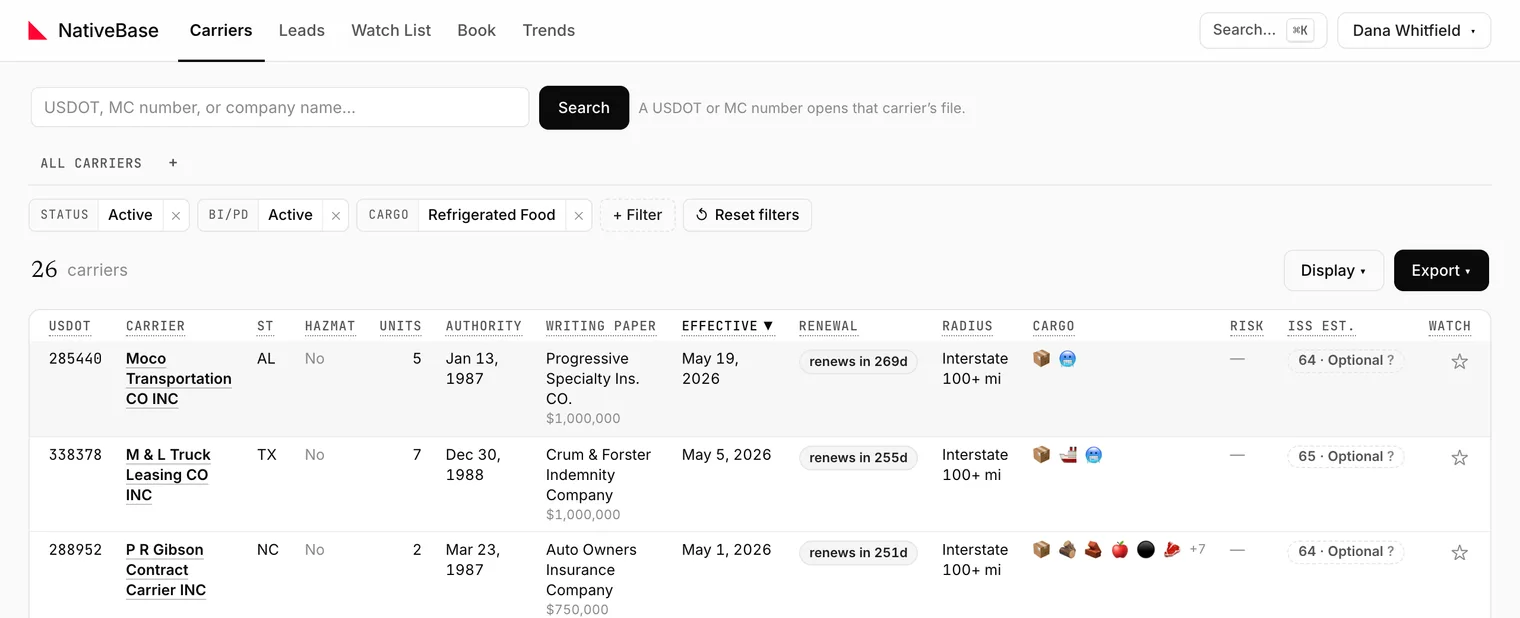
Only the ones you have set are shown; the rest sit behind the add-filter control. Each filter displays its current value as a summary, so you can read the whole filter set at a glance without opening anything.
#The filters
| Filter | Matches | Summary when unset |
|---|---|---|
| Search | Company name, USDOT or MC number | Any |
| Insurer | The insurer currently on file: the writing paper | Any |
| State | The carrier's domiciled state, from its census record | Any |
| Fleet size | Power-unit count, in fixed buckets | Any |
| Status | USDOT status: Active, Inactive, and MCS-150 overdue (an inactive USDOT whose authority and BI/PD filing are live) | Any |
| HazMat | Whether the carrier is placarded for hazardous materials | Any |
| BI/PD | Bodily injury / property damage filing on file: Active or None, and under Active optionally only federal (FMCSA) or only state (Texas Form E) filings | Any |
| Radius | Declared operating radius, in buckets | Any |
| Cargo | Declared cargo classifications, plus what the carrier wrote under Other (Sand & Gravel, Dirt & Fill) | Any |
| Segment | Niches FMCSA records no field for: Towing & recovery | Any |
| Risk | Loss-risk tier | Any |
| Reincarnation | Reincarnation risk tier | Any |
| Operates in | States the carrier has actually been inspected in | Any |
| Reach | Observed reach, derived from where it has been inspected | Any |
| Filing mismatch | Declared radius disagrees with observed footprint | Any |
| My book | Whether carriers already in your Book are shown | Shown |
| Renewal | Estimated renewal date (X-date) in the next 30, 60 or 90 days, or in a calendar month | Any |
#The ones that behave differently than they look
#Status
The default view selects two values, so the token reads Active + MCS-150 overdue. MCS-150 overdue is not a census status: it is a carrier FMCSA lists as inactive only because the biennial MCS-150 update was missed, while its operating authority and BI/PD filing are live. It is operating, so the default view lists it, labelled Inactive USDOT · MCS-150 overdue under the carrier name, in the peek and in exports, never as active. Leave only Active checked to drop these carriers. Inactive matches every inactive USDOT, these carriers included.
#BI/PD
Three states, not two: Active, None, or unset (Any). None means the carrier has no bodily injury / property damage filing on file. Combined with an active Status, that is a genuine compliance signal (an operating carrier without a required filing), not a data gap.
Active counts two kinds of filing. A federal filing (BMC-91/91X) is what for-hire carriers with operating authority file with FMCSA. A Texas Form E is the BI/PD certificate a Texas intrastate carrier's insurer files with the Texas DMV; about 32,000 Texas carriers are insured this way and have no federal filing at all. Those rows show TX Form E under the insurer, and their renewal date is the Form E's policy anniversary. Under Active you can narrow to Federal filing (FMCSA) or State filing only (Texas Form E). The Insurers tab and insurer profiles count federal filings only, so rankings compare across states.
Background: BI/PD filings, explained.
#Reincarnation
Tiers a carrier by how strongly it looks like a re-registration of an older, now-inactive carrier. The filter's own note states the basis: shares identifiers with an older, now-inactive carrier.
This is a signal to investigate, not a verdict. Background: Chameleon carriers.
#Operates in vs State vs Reach
Three different questions, easy to confuse:
- State: where the carrier is domiciled, per its census record.
- Operates in: states it has actually been inspected in.
- Reach: a bucketed summary of that same observed footprint.
A Texas-domiciled carrier inspected across eight states is State = TX, Operates in includes all eight.
#Filing mismatch
Set it and the grid keeps only carriers whose declared operating radius disagrees with their observed footprint. The summary reads Declared ≠ observed.
#My book
Only meaningful once you have imported a Book of business. Setting it to Hidden removes carriers you already write from the results: the fastest way to turn a prospecting list into a genuinely new-business list.
#Cargo
The MCS-150 has a checkbox for each of about thirty cargo classes, and none for sand, gravel or dirt. Dump and aggregate haulers tick Other and write it in, so Cargo also reads that text: those carriers are listed under Sand & Gravel and Dirt & Fill, and under Building Materials or Logs, Poles, Beams, Lumber when the text names those and the box was left unticked. The Carrier File's Cargo tab marks the classes read from the text and shows the text as filed. Type in the editor's search box to find a class.
#Segment
FMCSA records no tow-truck equipment type and no towing operation class, and its Driveaway/Towaway cargo box is ticked mostly by repair shops, dealers and general freight. Towing & recovery is read from the legal and DBA name instead: towing, tow, wrecker, rollback, roadside, repo or repossession, and recovery or road service alongside a vehicle word or the Driveaway/Towaway box. A tow company with none of those words in its name is not included. Typing tow in the add-filter menu lands on it.
#Renewal
Pick a rolling window (the next 30, 60 or 90 days) or a calendar month. A month means its next occurrence: in October 2026, Nov is November 1 to 30, 2026 (the filter reads In Nov 2026), the current month counts until it ends, and a month already past means next year's. A saved view set to a month moves on to next year by itself. Picking one kind of window clears the other.
Both filter on the estimated renewal date. Estimates are derived from filing history and some are more reliable than others; a carrier can be excluded from a window because its estimate is off, not because it does not renew then.
Background: What is an X-date in insurance?
Watch out
Filters compose with and, not or. Four filters that each match a large set can still produce zero rows together. When that happens the grid says No carriers match these filters. Use Reset filters rather than unwinding them one at a time.
#Counts next to options
Most multi-select filters show a count beside each option. Those counts reflect the current filter set, so they change as you narrow. An option with no count shown is one where the count has not been measured: it is not an assertion of zero.
Last reviewed