The Carriers grid
How the Carriers grid works in Market Tracker: searching by name, USDOT or MC number, the default view, the peek drawer, sorting, density and paging.
Carriers is the tab most sessions start in. It is the FMCSA carrier census as a filterable grid, with a live count of how many carriers match what you have set.
#Search
The search box accepts a company name, a USDOT number or an MC number. Suggestions appear as you type; selecting one opens that carrier's file directly rather than filtering the grid.
Search is also a filter: typing without picking a suggestion narrows the grid to name matches.
#The default view
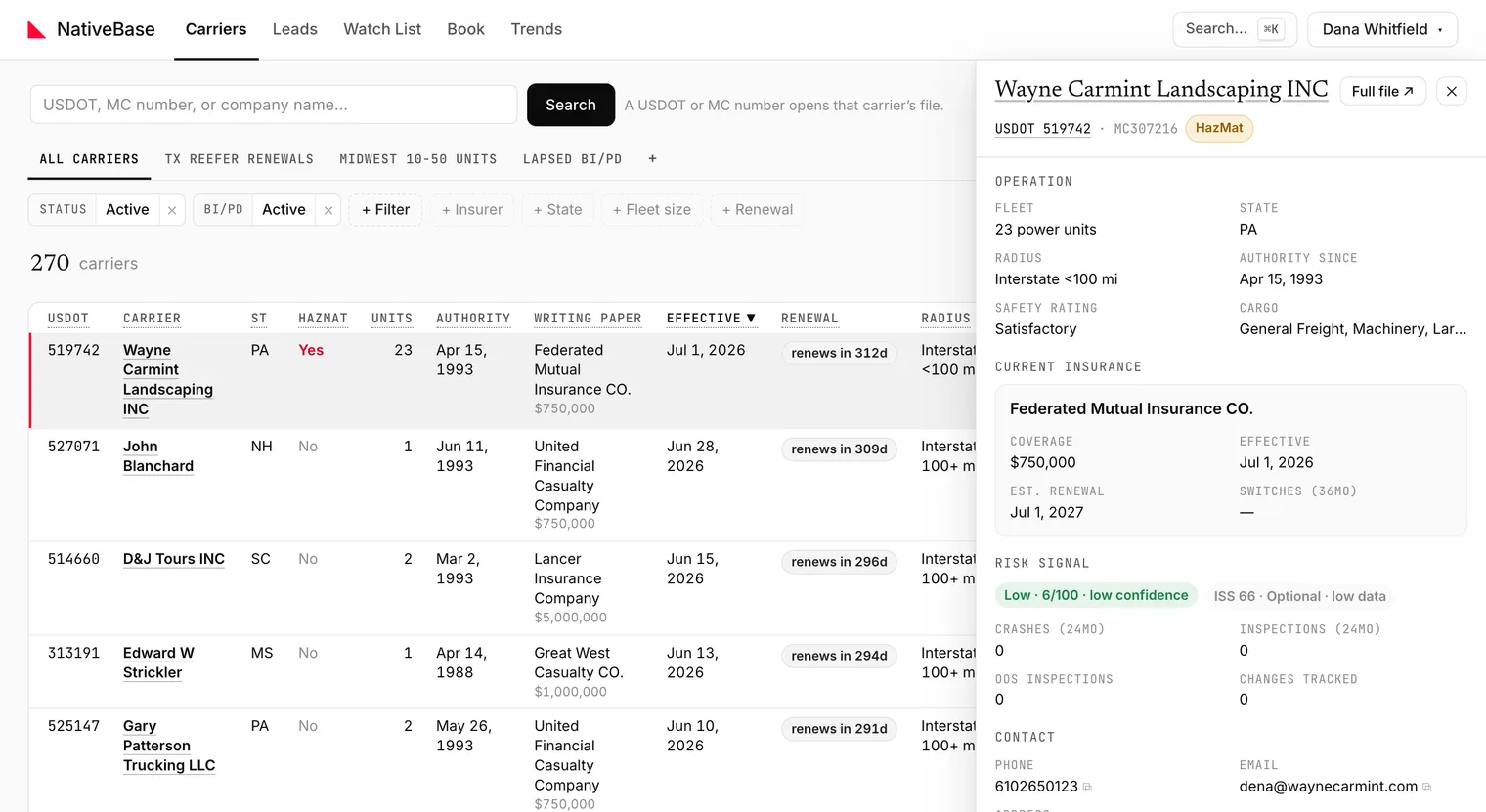
The grid opens on the All carriers tab. Its tooltip states what it is: the default view: active carriers with a BI/PD filing, plus carriers listed as MCS-150 overdue.
That matters. All carriers is not the entire census: it is a filter that excludes inactive carriers (other than the MCS-150 overdue group below) and carriers with no BI/PD filing on file. Clearing it widens the result set substantially. If a carrier you expect is missing, check this first.
One group is worth knowing about: FMCSA marks a USDOT inactive when the biennial MCS-150 update is missed, not only when a carrier stops operating. A carrier whose USDOT reads inactive while its operating authority and BI/PD filing are live is operating, and delinquent on the update. The default view includes these carriers: its Status filter reads Active + MCS-150 overdue, and each such row says Inactive USDOT · MCS-150 overdue under the carrier name, in the peek and in exports, never Active. Uncheck MCS-150 overdue to see active USDOTs only. Leads, the lead pulls and the state lead pages include them too, with an MCS-150 overdue badge.
#Rows, peek and the full file
- Click the USDOT to open the Carrier File: the full twelve-tab record.
- Click elsewhere in the row to open the peek drawer, a summary panel you can close without losing your scroll position or filters.
- Click the star to add the carrier to your Watch List.
#Columns and density
The display menu controls which columns are shown, how many rows a page holds, and how tightly rows are packed.
Three column details worth knowing. The X-date column labels how the estimate was made: a first-year estimate reads from the filing's effective date, and a continuous filing older than a year is projected to its next policy anniversary and says so (anniversary estimate). The Phone and Email cells mark a value that many carriers share (shared ×12): a registration service, a permit filer or a fleet's central office rather than the carrier's own line, and a placeholder number such as all zeros renders as a dash. The Writing paper cell is a link to the insurer's profile on the Insurers tab.
These choices are stored in the browser, not on your account, so they persist on the machine you set them on and do not follow you to another one.
#Paging
The grid pages rather than infinite-scrolls. Controls sit below the table: ← Prev, a Page n of n indicator, and Next →.
#Empty results
When nothing matches, the grid says No carriers match these filters. and offers Reset filters. Use it: it returns you to the default view in one step, which is faster and less error-prone than unwinding filters individually.
#Where to go next
- Carriers filter reference: all sixteen filters
- Saved views and email alerts: turn a filter set into a tab
- Exporting to CSV and Excel: caps and limits
Last reviewed