Saved views and email alerts
Save a Market Tracker filter set as a view, get daily or weekly email when new carriers match it, and understand why a broad view might never email.
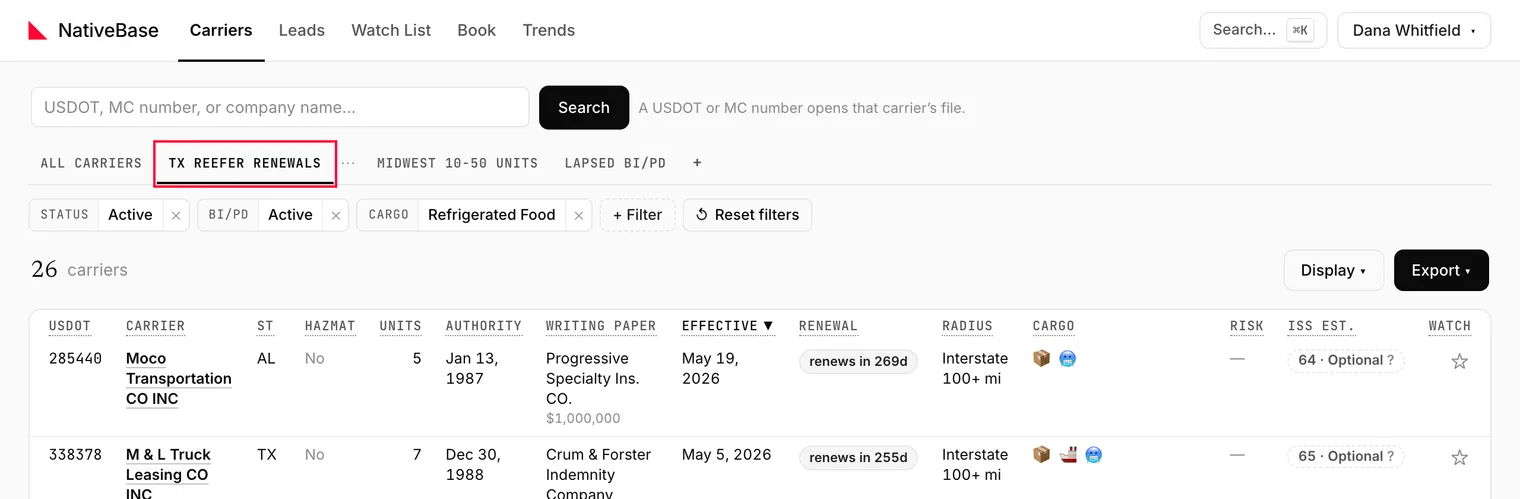
A view is a saved filter set promoted to a tab above the grid. Set your filters, click New view from current filters, name it, and it stays there. Optionally, Market Tracker emails you when new carriers start matching it.
#Saving a view
- Set the filters you want on Carriers.
- Click New view from current filters.
- Name it. The placeholder suggests the shape:
Name this view (e.g. TX reefer renewals).
The view appears as a tab beside All carriers.
#Changing a saved view
Edit the filters while a view is selected and an unsaved-changes indicator appears, along with a line reading Filters changed from …. Two options:
- Update view: overwrite the saved filters.
- Save as new: keep the original and create a second view.
Neither happens automatically. Navigating away discards the change.
#Email alerts
Each view has a cadence, set on the view itself:
No alertsEmail me new matches dailyEmail me new matches weekly
Alerts report new matches: carriers that did not match last time and do now. The first scan after you turn alerts on establishes a baseline and sends nothing. That is expected; the first real email arrives the following cycle.
Use Send sample email to see the format immediately without waiting for a cycle.
Watch out
A view that matches an extremely large set is skipped by the alert scan rather than emailed, and the app does not currently tell you this happened. If a broad view has never emailed you, narrow it: that is almost always the cause. This is logged as a product finding, not intended behaviour.
#Limits
There is a cap on how many views one user can save. Once you reach it, the save control is disabled and its tooltip shows the limit. Delete a view to free a slot. Current numbers: Limits and caps.
#What alerts are not
View alerts watch the market for new matches. They do not watch specific carriers for changes: that is the Watch List, which tracks named carriers and reports what changed on each.
Use both: a view to find carriers, the Watch List to follow the ones you decide to work.
Last reviewed